How to Create Seamless Repeating Textures for Website Backgrounds Using Offset Filters
How to Create Seamless Repeating Textures for Website Backgrounds Using Offset Filters
If site designers want to create visually attractive backdrops that do not have obvious boundaries or interruptions, one of the most important skills they need to have is the ability to create seamless repeating textures. When a texture is badly created, it might disclose rough seams, which can disrupt the immersion and give the impression that a website is not finished. Using the Offset filter in Photoshop, which enables you to realign picture boundaries and detect issue areas for rectification, Photoshop offers a method that is far more successful than other options. When it comes to user interface design, gaming assets, and digital backdrops, this approach is often used since it ensures that repetition seems immaculate. Through the use of the Offset filter in conjunction with the cloning, healing, and blending tools, it is possible to generate textures that tile flawlessly in any direction. The procedure calls for a high level of technical accuracy as well as an awareness of the importance of visual continuity. You will find that it is a strong complement to your design process after you have mastered it. It is possible to get consistent and high-quality outcomes across a variety of tasks by using an organized strategy. The purpose of this article is to provide guidelines on how to effectively build seamless textures while adhering to professional standards.
The Understanding of What Constitutes a Seamless Texture
When a texture may be repeated indefinitely without any obvious boundaries or edges that do not match, we refer to this as a seamless texture. In order to do this, the pixels that are next to the borders of the tile must be completely aligned with one another. Creating a seam that is obvious may be accomplished by any variance in color, lighting, or pattern. In order to achieve seamlessness, it is necessary to strike a precise balance between uniformity and intricacy. Patterns that are excessively complicated may be more difficult to combine, whilst textures that are excessively basic may look repetitious. The objective is to provide a fluent flow that conceals the repetition that is there. When you have a good understanding of how different textures interact with one another, you may recognize possible problems earlier. This information serves as the basis for making efficient use of the tools associated with Photoshop. Having a seamless texture that has been thoughtfully developed may improve the overall visual experience of a website.
When it comes to editing, preparing your base texture
When applying the Offset filter, it is essential to begin with a base texture that is appropriate for the application. Images with a high resolution provide more editing options and lower the likelihood of artifacts being seen in the final product. The illumination should be somewhat uniform across the texture in order to prevent abrupt transitions when the material is tiled. It is common practice to simplify the procedure by cropping the picture into a square shape. This guarantees that the repetition is consistent in both directions from left to right. By transforming the layer into a smart object, it is possible to alter the layer without causing any damage. It is possible to save time in the future by cleaning up glaring faults in advance. Once the texture has been properly prepared, it will react favorably to any alterations that are made. It is possible to make the whole process more effective and predictable by beginning with a clean setting.
Discovering Seams Through the Use of the Offset Filter
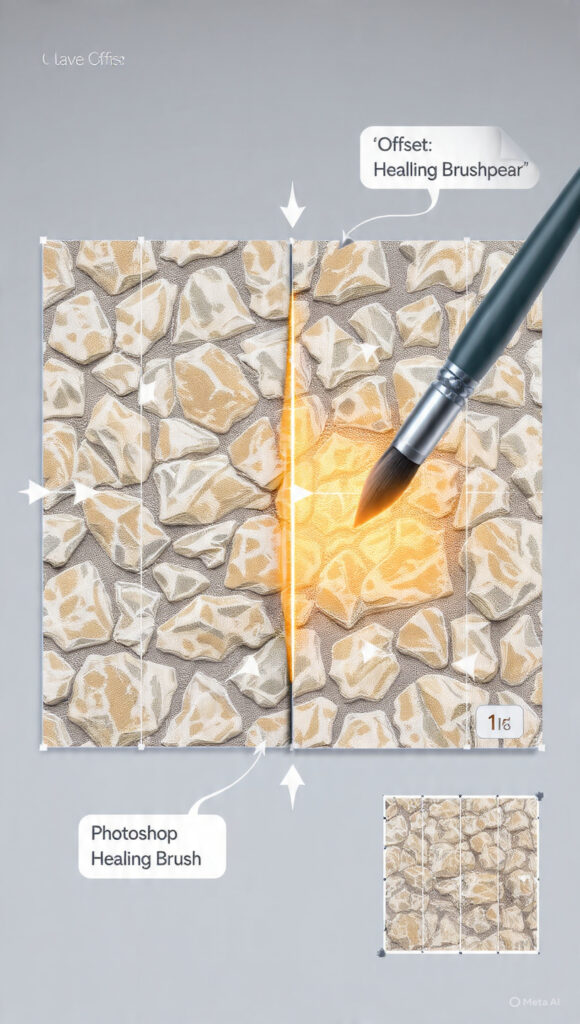
In order to determine the locations of seams that will occur in a repeating texture, the Offset filter is the most important tool. The boundaries of the canvas are brought closer to the center of the canvas by adjusting the picture in both the horizontal and vertical directions. Because of this, it is simple to figure out where the mismatches are. Adjusting the offset values such that they are equal to half of the width and height of the picture is the objective. Because of this adjustment, all of the seam lines are now visible. Once these seams are exposed, they may be repaired using a variety of different retouching techniques. Through the use of the Offset filter, concealed edge issues are effectively transformed into editing regions that are apparent. In order to successfully create seamless textures, it is essential to have a solid understanding of how to utilize this tool.
Seams that have been blended using the Clone Stamp and Healing Tools
After the seams have been exposed, the subsequent step is to blend them in seamlessly with the texture of the surrounding area. It is possible to duplicate pixels from one region and apply them to another using the Clone Stamp tool, which makes it an excellent tool for concealing edges that do not complement each other. The Healing Brush has the ability to further enhance the blend by automatically matching the color and texture of the mixture. Utilizing soft brush settings is an effective method for producing smooth transitions that seem natural. To prevent recurring trends, it is essential to collect samples from a number of different locations. It is possible to get exact adjustments by working slowly and zooming in. The combination of these instruments is an excellent method for removing apparent seams. In order to get a polished and smooth effect, this step is very necessary.
Keeping the Texture Consistency Across the Entire Canvas
To ensure that the texture density and pattern distribution remain consistent during the blending process, it is necessary to maintain consistency. Excessive editing of certain sections might result in the creation of obvious patches that impair the overall appearance. While ensuring that no single location shines out in an unnatural way, it is important to balance the details over the whole canvas. In order to ensure that the modifications are successful, it is helpful to toggle the Offset filter on and off on a regular basis. In addition, it is beneficial to zoom out at regular intervals in order to observe the texture in its entirety. As a result of this larger view, problems that may not be obvious at close range are brought to light. In order to create a recurring pattern that is credible, consistency is essential. In order to achieve a consistent and professional finish, careful attention to detail is required.
This is a test of the texture, which is performed many times.
Following the blending of seams, it is necessary to test the texture in order to ensure that it tiles without noticeable gaps. It is possible to do this by making a copy of the texture layer and placing the duplicates next to one another. Monitoring the manner in which the edges align within a bigger pattern is an effective method for locating any lingering irregularities. Additional modifications may be performed using the same blending procedures if seams are still evident after the changes have been made. By testing the texture at a variety of scales, one may get more insight into how the texture will seem when it is used in the real world. Performing this process guarantees that the final product will be of a satisfactory quality. Performing exhaustive testing helps to avoid problems from surfacing later on in design initiatives.
Making Texture Size and Resolution More Appropriate for Use on the Web
When designing backdrops for websites, it is essential to strike a balance between quality and performance. Large textures may give the impression of being detailed, but they might slow down the loading speeds of a site. It is possible to get ideal performance by decreasing the size of the picture while preserving its quality. In order to prevent the introduction of artifacts, compression parameters should be selected with great care. Additionally, it is essential to test how the texture looks on a variety of screen sizes and resolutions. A better user experience may be achieved by ensuring compatibility across all devices. While ensuring that the texture continues to be visually attractive, proper optimization guarantees that the speed of the website is not negatively impacted. For the actual application, this step is absolutely necessary.
Construction of a Reusable Workflow for the Creation of Textures in the Future
Through the use of a standardized methodology that can be utilized across several projects, the process of creating seamless textures becomes more efficient. Having the ability to save templates, presets, and actions enables you to reproduce strategies that have shown to be effective. In addition to assisting in the maintenance of consistency, documenting your approach also helps to lessen the learning curve for future work. Both the pace and the quality of your work will increase as you continue to refine your approach. The use of a method that can be repeated guarantees that every new texture will be up to the same professional standards. You are able to generate seamless textures of a high quality on a continuous basis if you include the Offset filter and blending methods into your routine. Design processes that are both scalable and efficient may be supported by this technique.