Applying the Puppet Warp Tool to Smart Objects for Realistic Cylindrical Packaging Mockups
Applying the Puppet Warp Tool to Smart Objects for Realistic Cylindrical Packaging Mockups
In today’s world of contemporary branding and e-commerce marketing, product presentation has increasingly become an essential component. Realistic mockups of packaging are becoming more important to businesses as a means of visualizing labels, logos, and promotional designs prior to the entry of items into production. Due to the fact that flat artwork must naturally adapt to curved surfaces, cylindrical package types such as beverage cans, cosmetic containers, food jars, and supplement bottles provide a unique set of design problems. When it comes to replicating the small aberrations that are necessary for true outcomes, traditional transformation approaches often stumble. In order to provide a solution that is more adaptable, the Puppet Warp tool enables exact modification of design elements while maintaining the integrity of the visual presentation. When paired with Smart Objects, designers are able to take use of non-destructive editing, which streamlines the revision process while preserving the quality of the original assets. It is possible for designers to build very realistic mockups of cylindrical packaging by gaining an understanding of how to incorporate Puppet Warp into Smart Object operations. These mockups are able to successfully express product ideas and assist professional marketing presentations.
Having an Understanding of the Importance of Creating Realistic Mockups of Packaging
For the purpose of bridging the gap between conceptual ideas and actual goods, packaging mockups serve as useful visualization tools. In order to assess branding choices prior to the beginning of production, clients, marketing teams, and stakeholders often depend on these representations. Realistic mockups are useful for determining design discrepancies, evaluating label positioning, and ensuring that visual elements work successfully on real package structures. Artwork must be able to adapt to curved surfaces while still preserving readability and aesthetic harmony when it comes to cylindrical objects. This presents extra challenging circumstances. Inadequately constructed distortions have the potential to damage the credibility of a presentation and misrepresent the look of the finished result. For the purpose of enhancing the professionalism of design deliverables, investing time in the construction of correct mockups promotes communication, supports educated decision-making, and supports informed decision-making.
When it comes to mockup design, the advantages of using smart objects abound.
Intelligent Objects serve as the basis for packaging procedures that are both efficient and non-destructive. Through the use of editable containers, Smart Objects are able to maintain the integrity of the original design while also enabling the application of modifications and alterations from the outside. Without having to start from scratch, designers are able to make changes to logos, alter fonts, or swap complete label designs without having to recreate the prototype. When it comes to client modifications or product line extensions that include several package options, this flexibility becomes very beneficial. In addition, Smart Objects preserve picture quality by avoiding the rasterization and deterioration of the image that occurs repeatedly while editing. A broad variety of commercial design projects may benefit from their incorporation into packaging operations since it encourages uniformity, boosts productivity, and provides support for long-term adaptation.
An Investigation into the Capabilities of the Puppet Warp Tool
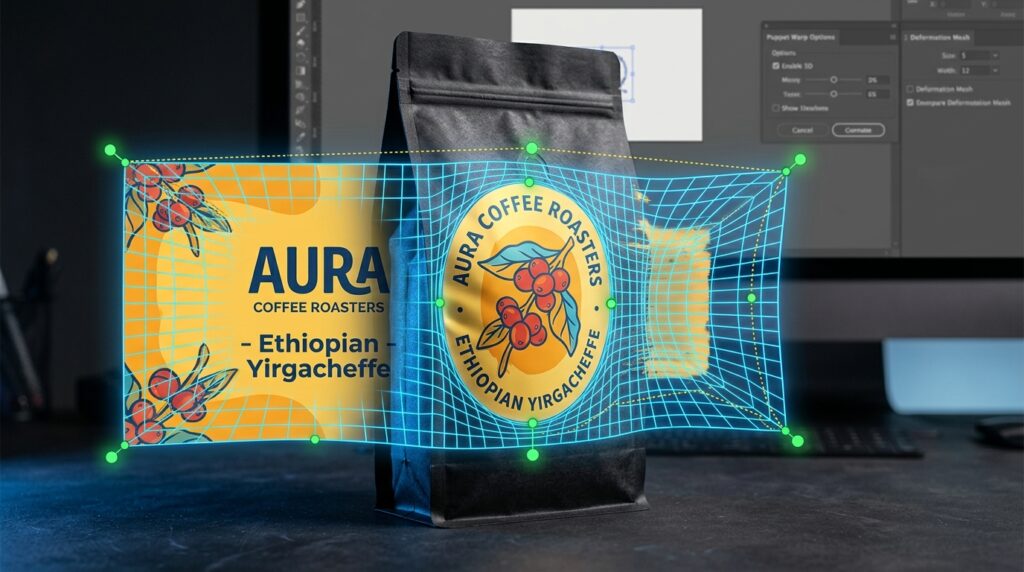
A complex way for altering visual components is provided by the Puppet Warp tool. This method involves the introduction of control points that may be adjusted throughout an object. While typical transformation commands apply uniform distortions, Puppet Warp enables targeted manipulation that closely simulates the behavior of flexible materials. This is in contrast to the usual transformation commands. In order to manage the way artwork conforms to curved package surfaces while maintaining crucial design connections, designers might strategically put pins in the appropriate locations. The use of this level of control is especially advantageous for cylindrical mockups, which are characterized by labels that naturally bend around containers. It is possible to fine-tune distortions in a step-by-step manner, which results in product visualizations that are more believable and properly represent the features of real-world packaging.
The process of preparing artwork for adaptation on cylindrical surfaces
Preparing the source artwork with careful consideration is the first step in making effective use of Puppet Warp. When designing labels, it is important to ensure that they have a sufficient resolution and ordered layer structures to accommodate any future revisions. Transforming finished artwork into Smart Objects before performing transformations guarantees that any adjustments will continue to be reversible and will not cause any damage to the original artwork. The interaction of important visual components with curved surfaces is another factor that designers need to take into consideration. These items include logos, product names, and regulatory information. It is common practice to safeguard readability by positioning essential material in close proximity to the center viewing area. This allows outlying areas to absorb more significant distortions. Obtaining realistic simulations of packing requires proper preparation, which lays a firm basis for the result.
Using Puppet Warp to Create Effects Of Natural Curvature Through Application
In order to effectively create believable cylindrical mockups, it is necessary to carefully position and tune the control points of Puppet Warp. By positioning pins along the vertical and horizontal axes of the label, one may better specify the manner in which the artwork wraps around the container. There are subtle inward distortions around the borders that mimic the natural perspective that is associated with curved package surfaces. When creating a mockup, it is important to avoid excessive modification since stretching or compression that is not realistic might put the mockup’s credibility at risk. The use of incremental modifications allows designers to analyze the impact in a step-by-step manner while also providing a higher degree of control. Through the use of careful pin management, Puppet Warp makes it possible for artwork to perfectly blend with cylindrical product shapes while still preserving the integrity of the design.
Maintaining the Consistency of the Brand During the Distortion
The maintenance of brand consistency during the process of distortion is one of the most significant issues that are associated with package visualization work. When adapting to curved surfaces, it is essential that logos, typography, and design elements continue to be easily recognized. By enabling designers to review source artwork anytime revisions are required, Smart Object procedures make it easier to achieve this purpose. Keeping a close eye on the dimensions and alignment of major branding components is essential to ensuring that they continue to portray the desired image. It is important for designers to make regular comparisons between the distorted mockup and the original artwork in order to spot any unwanted changes. A stronger brand awareness and increased trust in the correctness of the final presentation are both achieved via the maintenance of consistency.
Developing Mockups with Additional Enhancements to Their Realistic Capabilities
Although Puppet Warp is responsible for establishing the fundamental curvature of cylindrical packaging, other modifications often bring mockups to a level of professionalism that is more professional. For the purpose of creating the appearance of physical shape and material characteristics, highlights, shadows, reflections, and subtle texture overlays are all significant contributors. By incorporating these effects in a non-destructive manner, designers are able to accommodate a variety of packaging materials, including metal, plastic, and glass, by adjusting the visual qualities of the package. By facilitating a more natural interaction between the artwork and the underlying product structure, layer masks and blending methods contribute to an even higher level of realism. These enhancements convert simple label applications into visually engaging representations that are ideal for use in marketing campaigns and presentations to clients.
Implementing Intelligent Workflows for Efficiently Managing Revisions
As goods progress through the various phases of development, packaging initiatives usually include many rounds of adjustments from the beginning. Integrating Smart Objects results in a considerable reduction in the amount of work that is necessary to handle changing circumstances. It is possible for designers to make a single edit to the embedded artwork, and instantly disseminate the changes across the whole mockup structure. This functionality is especially useful when it comes to managing product variants, seasonal marketing, or adjustments to regulatory requirements. In order to further increase workflow efficiency, it is important to keep layer hierarchies tidy and to accurately identify Smart Objects. In order to construct mockup systems that are capable of supporting complicated revision processes without compromising quality or efficiency, designers combine the adaptability of Smart Objects with the flexibility of Puppet Warp.
The Development of Professional Presentations for Cylindrical Packaging
The use of the Puppet Warp tool in conjunction with Smart Objects is an advanced method for producing realistic prototypes of cylindrical packaging. At the same time as it maintains the non-destructive flexibility that is vital in professional design contexts, this combination offers the accuracy that is required to replicate natural curvature. Designers are able to generate compelling product visualizations that effectively express branding ideas if they thoughtfully prepare, use smart distortion methods, and continue to enhance their visualizations. To further boost the value of this process inside commercial projects, the capability to accept adjustments in an effective manner is essential. Mastering these strategies provides designers with the abilities necessary to generate mockup presentations that are polished, adaptive, and highly successful. This is because package design continues to play a major role in product marketing.