How to Prevent Color Banding When Expanding Solid Black Backgrounds for E-Commerce Product Shots
How to Prevent Color Banding When Expanding Solid Black Backgrounds for E-Commerce Product Shots
One of the most essential aspects of good e-commerce photography is the creation of product photographs that are free of any imperfections. It is common practice to utilize a solid black backdrop in order to produce an image that is both luxury and sophisticated. Customers anticipate professional graphics that clearly exhibit items without any distractions. Nevertheless, color banding is a common problem that occurs during post-processing for photographers and picture editors when they are expanding or extending black backgrounds. Rather than a seamless transition, noticeable stripes or tonal steps develop over darker regions. This results in a decrease in picture quality and makes the modifications seem amateurish. On screens with a high resolution and on new mobile devices, color banding is considerably more obvious than it already is. While it is possible to preserve a smooth backdrop, it is helpful to understand why this problem develops and to acquire the appropriate editing strategies. Editors are able to generate polished product images that are up to the requirements of professional e-commerce by using the appropriate color management, bit depth settings, and noise reduction procedures.
Recognizing the Factors That Contribute to Color Banding
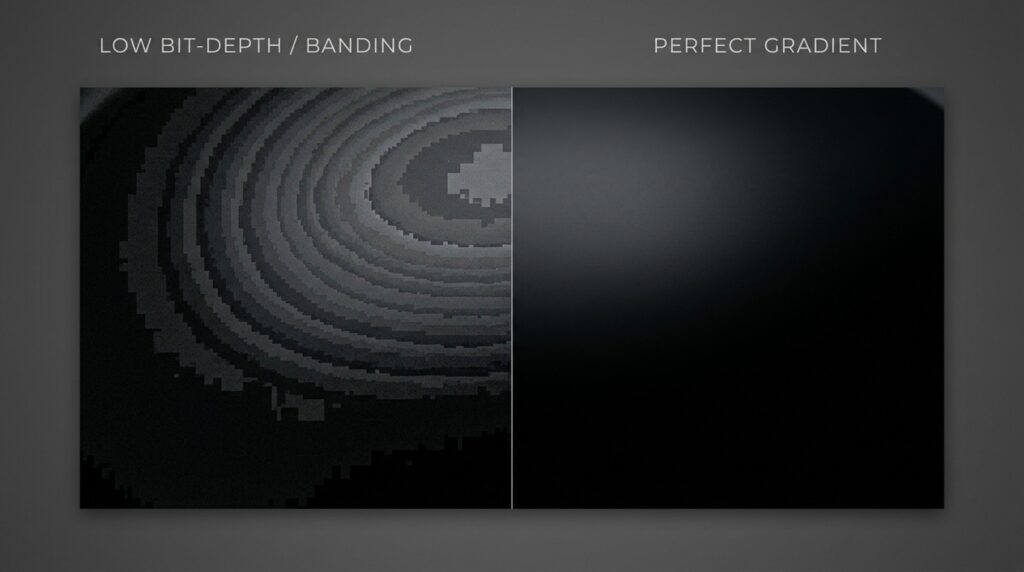
By displaying progressive tonal transitions with an inadequate amount of color values, color banding is a phenomenon that may arise. Rather of displaying a gradual transition from one hue to another, the picture shows obvious steps between the shades. Because human eyesight is able to quickly perceive minute variations between black and near-black tones, this issue is particularly prevalent in locations that are dark. The limited tonal information may get extended over a bigger region when editors expand a black backdrop using gradients, cloning, or fill tools. This may happen when the background is expanded. Compression, incorrect export settings, and harsh modifications might significantly diminish the amount of tone data that is accessible. As a consequence of this, smooth shadows get split into noticeable bands, which has a detrimental effect on the picture quality and professionalism.
During the editing process, working with a higher bit depth
Editing photographs with a greater bit depth is one of the most effective strategies for avoiding color banding from occurring. As a result of the much lower number of tonal values included in an 8-bit picture compared to a 16-bit image, smooth transitions are more difficult to maintain. When extending black backgrounds, editing software is able to compute progressive changes more correctly when it has access to extra tonal information. The use of 16-bit mode helps to maintain delicate shadow characteristics and lowers the possibility of abrupt tonal leaps occurring. During the process of applying curves, levels, or exposure changes, this information becomes very significant. For the duration of the editing process, keeping the bit depth at a higher level allows for more flexibility and reduces the likelihood of noticeable banding occurring prior to the final export step.
Making Use of Appropriate Techniques for Background Extension
The technique that is used to enlarge a black backdrop has a direct impact on the possibility of banding occurring. It is possible to produce undesirable tonal transitions by simply extending out pixels that are already there or by adding big gradient fills. The editors should instead make use of sophisticated cloning, tools that are aware of the text, and layer approaches that are meticulously blended. When compared to depending on a single huge fill operation, building the extension gradually with many adjustment layers often provides results that are more realistic. It is possible to spread tonal changes over the picture in a fluid manner by using feathered masks and subtle brush transitions. By avoiding excessive alterations and retaining the original shadow structure, editors are able to keep the look of the extended background area constant over the whole region.
How to Handle Compression and Different File Formats
One of the most important factors that contributes to the appearance of color banding is image compression. The removal of tonal information and the introduction of artifacts that become very noticeable on dark backgrounds are both consequences of excessive compression. Compressed formats are helpful for reducing file sizes for online businesses; nevertheless, settings that are too aggressive might be detrimental to picture quality. If you want to keep the tonal data intact during editing, you should utilize lossless formats whenever it is feasible to do so. The export parameters should strike a balance between quality and performance without compromising the seamless transitions it provides. In order to guarantee that meticulously edited black backgrounds stay constant across a variety of devices, browsers, and display technologies used by online buyers, it is essential to maintain appropriate picture quality throughout the process.
To lessen the effects of banding, adding controlled noise
A little quantity of regulated noise may successfully disguise color banding, despite the fact that noise is often believed to be undesirable despite its presence. Banding is observable due to the fact that broad sections possess tonal values that are uniform and abrupt transitions. It is possible to give the impression of smoother gradients by introducing modest noise, which breaks up these transitions. The idea is to introduce noise in such a way that it is almost undetectable to viewers while simultaneously interrupting the tonal steps that are evident. Retouchers who work professionally often apply a little amount of monochromatic noise to dark backgrounds after they have finished making substantial changes. Photography, digital design, and video production are all fields that make extensive use of this approach since it helps maintain the smoothness of the visual experience without drastically reducing the overall picture quality.
Monitoring Instruments for the Purpose of Accurate Evaluation
The fact that color banding is not evident throughout the editing process is the source of a significant number of editing errors. Uncalibrated monitors have the potential to conceal tiny tonal abnormalities, which may then manifest themselves on client devices. Calibration of the display by a professional guarantees that shadows, highlights, and color transitions are accurately represented. In order to properly evaluate black backgrounds, editors should always check photos on numerous monitors whenever it is practicable to do so. The ability of high-quality monitors with strong contrast performance to uncover tonal discrepancies is superior than the ability of entry-level panels because of this. It is also possible to discover concealed banding by viewing photos at several brightness levels. Display calibration that is accurate enables editors to identify potential issues at an early stage and make necessary adjustments before uploading product photos to the internet.
Using the Adjustments for the Gradient and Shadow with Caution
Adjustments to the gradient and shadows are often necessary in order to obtain a professional appearance when working with dark backdrops. Extreme modification, on the other hand, may cause color banding to appear even in source files of good quality. It is possible to compress tonal information into limited ranges by using techniques such as large shadow lifts, aggressive curves, and abrupt contrast shifts. When making edits, editors should avoid making drastic changes and instead make subtle tweaks. While a single significant change may create smoother results, several little adjustments often give smoother outcomes. The use of layer masks, targeted fixes, and approaches that are not destructive allows for improved control over tonal transitions. To retain a clean and professional black backdrop that is suited for e-commerce product display, careful editing helps to preserve the natural shadow depth of the image.
Perform Image Testing on a Number of Different Devices
When viewed on a different device, a picture that might seem to be flawless on one screen can have banding difficulties. Display technology and contrast capabilities vary from device to device, including desktop displays, laptops, tablets, and smartphones. To uncover anomalies before to publishing, it is helpful to test product photographs across a variety of devices. Those in charge of editing should study dark backgrounds in full scale and under circumstances that are as realistic as possible. Excessive zooming in may expose features that clients may never see, yet viewing simply a thumbnail may conceal significant flaws in the product. The use of a well-balanced testing procedure guarantees that black background extensions will continue to be smooth and professional across a broad variety of consumer devices. This, in turn, contributes to an improved shopping experience and a more powerful presentation of the product.
The Maintenance of a Professional Workflow in Order to Achieve Consistent Results
It is necessary to have both technical expertise and disciplined workflow management in order to prevent color banding from occurring simultaneously. The first step in achieving consistency is to acquire high-quality source photographs with the appropriate exposure settings. Maintaining a high bit depth, limiting damaging modifications, using extension methods with caution, and picking export parameters that are acceptable are all factors that lead to better outcomes. Performing cross-device testing and regular monitor calibration are two more ways to enhance quality control. By implementing these methods into each and every editing assignment, photographers and retouchers are able to produce immaculate black backgrounds that not only increase the visibility of products but also reinforce the legitimacy of brands. Not only does a professional workflow cut down on the number of technical issues that arise, but it also guarantees that the photographs of e-commerce products are up to the visual standards that are present in online marketplaces that are highly competitive.